



Τα Κορυφαία 5 Χαρακτηριστικά που Πρέπει να Έχει ένα Προσαρμόσιμο Περιβάλλον Εργασίας POS
Ένα προσαρμόσιμο περιβάλλον εργασίας POS προσαρμόζεται στην επιχείρησή σας και όχι το αντίθετο. Δείτε τα πέντε χαρακτηριστικά που έχουν τη μεγαλύτερη σημασία.
 Mathias NielsenCEO, Final POS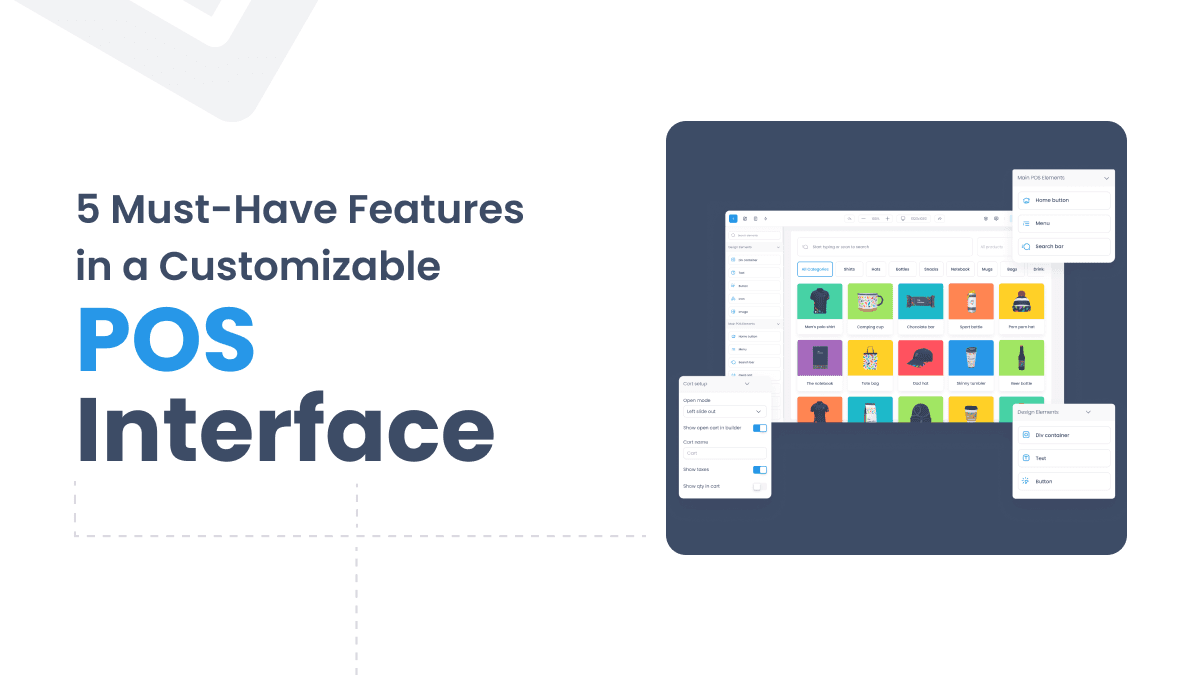
Does your current POS system change how you run your business to fit its capabilities? Point-of-sale systems for many companies are inflexible and don't suit their needs. This challenge is solved by a customizable POS interface that allows you to customize your checkout process to meet your requirements.
Not all businesses need the same thing. Other than just transaction processing, a POS system that enables customization offers a lot more. With modern POS development, you will create software that adapts to your business model instead of the other way around. Custom POS solutions improve the customer experience and streamline operations across retail stores and restaurants.
In this piece, we’ll look at five key features your customizable POS interface should have to transform your business operations. They are going to assist you in creating a more effective and profitable point-of-sale system that will scale with your business.
Interface customization needs understanding.
A customizable POS interface that fits your business operations can make your business work better. The success of a customizable POS system relies on three essential elements: role-based access control, industry-specific requirements, and development space.
Access requirements based on Role
Your POS system should have different levels of access for different users. Each role requires specific permissions in a custom POS. Simple transaction access should be given to cashiers and full administrative control to managers. This setup allows you to have control over your operations and keep them running smoothly.
Interface needs that are industry-specific
Every industry has its own needs from its point of sale system. Businesses of all types have their own requirements:
Inventory management and customer loyalty are needed in retail stores.
Table management and order tracking are needed in restaurants.
Appointment scheduling integration is needed for healthcare facilities.
Booking and resource management tools are needed for service businesses.
Scalability considerations
Your POS software solution should grow with your business. Your POS system must adapt to:
Higher transaction volumes
More store locations
New product lines
Growing service offerings
Your business will grow without having to upgrade the system. Your POS system should be customizable to work with new technologies and market changes and should be able to provide steady performance throughout your operations.
Essential UI/UX Design Elements
When designing a customizable POS interface, development decisions are led by the user experience. Three basic UI/UX elements make up a quick and user-friendly POS development that leads to success.
Natural navigation patterns
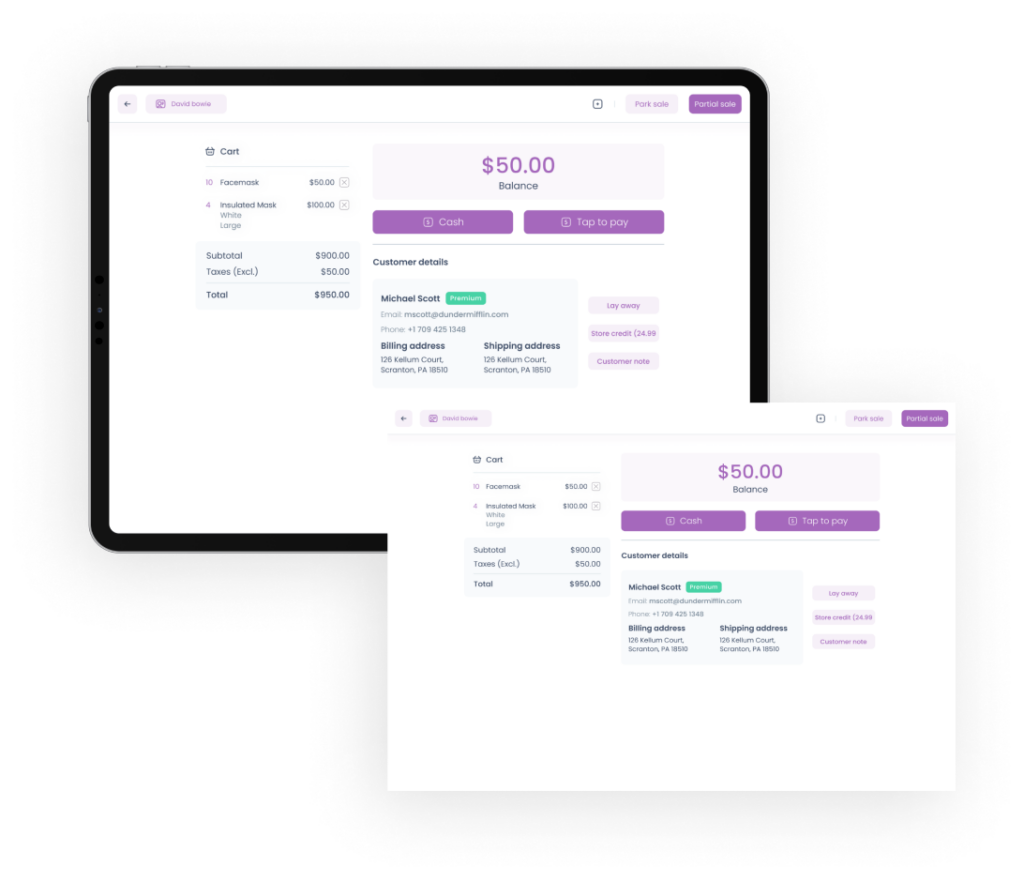
Navigation feels natural with smart grid tiles and dynamic cart responses, each with clear labels. With a customizable POS system, users are led through transactions with minimal effort. Frequent functions are easy to access for users. It takes just two to three clicks for every action, helping it to move fast during rush hours.
Visual hierarchy optimization
Visual organization is important for quick information processing. We achieve this through:
Strategic size and contrast highlight important elements
The same colour codes are used for related functions.
Interface sections have specified spacing
High-contrast backgrounds make text readable
Responsive design principles
The custom POS solutions we offer play well on all types of devices and screen sizes. Today, modern businesses need the flexibility to use desktop terminals, tablets, or mobile phones. It does all this with an automatic layout of the interface while maintaining its functionality and visual style. Your POS software is fully customizable and performs its best on any device.
The design elements in these are professional interfaces that improve the operational speed. Together, the whole works to provide the users with a smooth, natural experience. It means less training time and less chance of making a mistake.
Performance Optimization Capabilities
Business success is driven by a high performing, customizable POS interface. With optimal resource use, our system delivers lightning-fast speeds. Even under tough conditions, it remains reliable.
Speed optimization techniques
However, our advanced optimization methods have reduced transaction times dramatically. On average, the custom POS processes transactions in 45 seconds. An item scan takes just 3 seconds. Here's what makes it so fast:
Pulls data quickly
Simplified payment processes
Better data transmission protocols.
Better inventory search algorithms
Resource management features
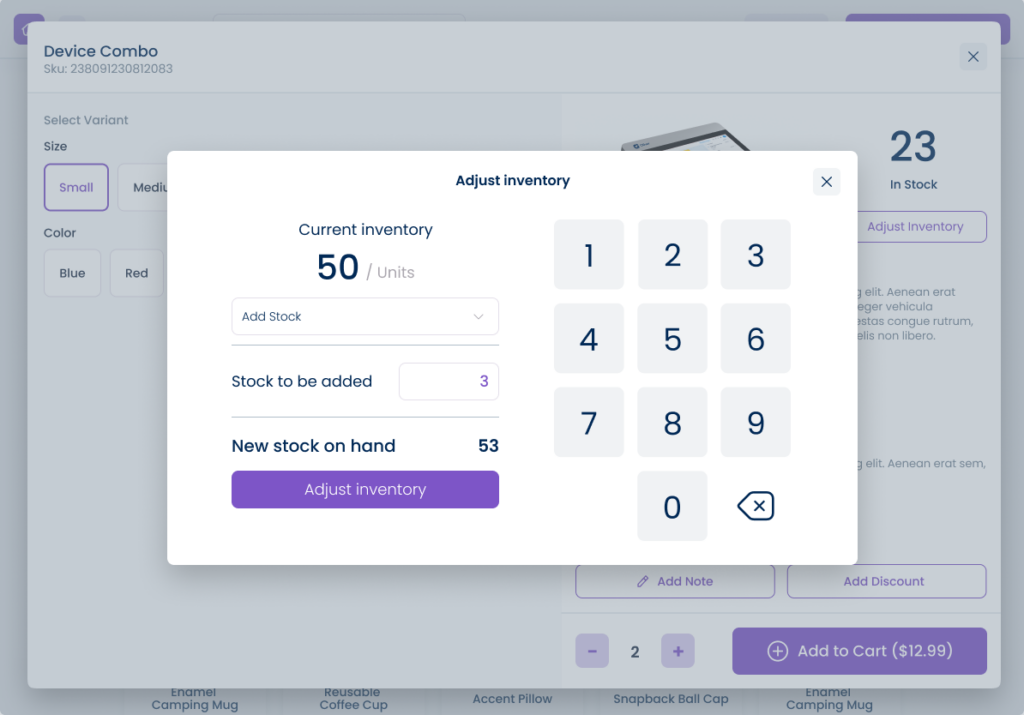
Your business resources are handled with precision by your customizable POS system. The live inventory tracking also updates stock when a sale occurs. Keeping detailed records and tracking products from location to location. Smart resource distribution guarantees that your POS runs at its best during rush hours without slowing down.
Offline functionality
That’s why internet problems shouldn’t stop your business. That’s why our POS software is so customizable and has such strong offline features. If the internet drops, the system automatically switches to offline mode. That makes it run core functions like sales and inventory. It is local storage and smart data sync to make your business run smoothly. Once you’re back online, all data updates automatically.
Conclusion
The lifeblood of modern business operations is a customizable POS interface. It essentially revolutionizes how companies manage their point-of-sale processes. We investigate how, at various user levels, role-based access control ensures security and optimizes operational efficiency.
Accessible UI/UX design combined with smart automation allows staff and customers to have a smooth experience. Strong performance optimization capabilities are combined with these features. Businesses can process high transaction volumes without the need to slow down or compromise on reliability.
We demonstrated that offline functionality and resource management ensure operations during connection problems. Analytical recommendations help improve sales by suggesting intelligent suggestions. Today’s POS systems are more than transaction processing systems; they are powerful development tools and a tool to enhance customer satisfaction.
Συχνές ερωτήσεις
Τι είναι μια προσαρμόσιμη διεπαφή POS;
Μια προσαρμόσιμη διεπαφή POS είναι ένα σύστημα σημείου πώλησης που μπορεί να διαμορφωθεί ώστε να ταιριάζει στις συγκεκριμένες ροές εργασιών της επιχείρησής σας, στους ρόλους χρηστών και στις απαιτήσεις του κλάδου σας. Αντί να αναγκάζει την επιχείρησή σας να προσαρμοστεί σε ένα σταθερό λογισμικό, σας επιτρέπει να διαμορφώσετε την εμπειρία checkout γύρω από τις λειτουργίες σας. Αυτό περιλαμβάνει την προσαρμογή της πλοήγησης, των δικαιωμάτων και της διάταξης για διαφορετικές συσκευές και μέλη της ομάδας.
Γιατί έχει σημασία η πρόσβαση βάσει ρόλων σε μια διεπαφή POS;
Ο έλεγχος πρόσβασης βάσει ρόλων σάς επιτρέπει να εκχωρείτε συγκεκριμένα δικαιώματα σε κάθε τύπο χρήστη, όπως το να δίνετε στους ταμίες βασική πρόσβαση σε συναλλαγές, ενώ οι διαχειριστές έχουν πλήρη έλεγχο διαχείρισης. Αυτό προστατεύει τα ευαίσθητα δεδομένα και διατηρεί την ομαλή λειτουργία των δραστηριοτήτων. Μειώνει τον κίνδυνο σφαλμάτων ή μη εξουσιοδοτημένων αλλαγών κατά τις περιόδους αιχμής.
Μπορεί μια προσαρμόσιμη διεπαφή POS να λειτουργήσει χωρίς σύνδεση στο διαδίκτυο;
Ναι. Μια καλά σχεδιασμένη προσαρμόσιμη διεπαφή POS περιλαμβάνει λειτουργία εκτός σύνδεσης (offline) που μεταβαίνει αυτόματα σε τοπική λειτουργία όταν διακόπτεται το διαδίκτυο. Οι βασικές λειτουργίες, όπως η επεξεργασία πωλήσεων και η παρακολούθηση αποθεμάτων, συνεχίζουν να λειτουργούν. Μόλις αποκατασταθεί η σύνδεση, όλα τα δεδομένα συγχρονίζονται αυτόματα.
Πώς επηρεάζει η σχεδίαση UI/UX την απόδοση του POS;
Η καλή σχεδίαση UI/UX μειώνει τον αριθμό των κλικ που απαιτούνται για την ολοκλήρωση μιας συναλλαγής, γεγονός που επιταχύνει την εξυπηρέτηση κατά τις ώρες αιχμής. Λειτουργίες όπως τα έξυπνα πλακίδια πλέγματος (grid tiles), η συνεπής χρωματική κωδικοποίηση και το κείμενο υψηλής αντίθεσης βοηθούν το προσωπικό να επεξεργάζεται τις πωλήσεις γρήγορα και με ακρίβεια. Ο λιγότερος χρόνος που δαπανάται για την πλοήγηση στη διεπαφή σημαίνει επίσης λιγότερο χρόνο εκπαίδευσης για τους νέους υπαλλήλους.
Πώς πρέπει να επεκτείνεται μια διεπαφή POS καθώς αναπτύσσεται μια επιχείρηση;
Μια επεκτάσιμη διεπαφή POS θα πρέπει να μπορεί να διαχειρίζεται μεγαλύτερους όγκους συναλλαγών, επιπλέον τοποθεσίες καταστημάτων, νέες σειρές προϊόντων και διευρυμένες προσφορές υπηρεσιών, χωρίς να απαιτείται πλήρης αντικατάσταση του συστήματος. Το άρθρο επισημαίνει ότι η λύση λογισμικού POS που χρησιμοποιείτε θα πρέπει να αναπτύσσεται μαζί με την επιχείρησή σας και να προσαρμόζεται στις νέες τεχνολογίες και τις αλλαγές της αγοράς με την πάροδο του χρόνου.