



How to Build a Price Checker Kiosk with Final
Learn how to design and build a custom price check kiosk using Final Builder, from hardware selection to real-time inventory integration.
 Mathias NielsenCEO, Final POS
Retail stores face a stark reality: Up to 4 percent of annual revenue is drained away by price discrepancies and inefficient checking systems.
Self-service price check kiosks are becoming increasingly popular, and smart retailers know their power. Purpose-built solutions eliminate customer wait times and free up staff to focus on high-value activities.
Price check kiosks offer dual benefits: improved customer experience and streamlined operations.
You need a professional price-checking system for your retail space. With Final, you can create your own custom kiosk applications that suit your needs. This guide takes you through every essential piece from the starting hardware decisions to interface design and system integration.
Are you ready to build a price check kiosk suited to your exact business needs? The step-by-step approach we follow helps you build a solution which will be efficient as well as satisfy the customer. It’s time to make your vision a reality.
Planning Your Price Check Kiosk
Smart planning is the start of success stories. Key elements shaping the performance of your retail space for your price check kiosk need careful consideration. So let’s look into the building blocks of an awesome kiosk system.
Defining Core Requirements
This is where the smart kiosk design begins: with crystal clear specifications based on your business goals. These requirements are determined by local regulations – in Massachusetts, for example, there is one price checker for every 5,000 square feet of retail space. Your checklist must include:
Strategic placement for maximum customer reach
Instant price verification capabilities
Seamless inventory system connections
Full compliance with local pricing laws
Choosing Hardware Components
The success of your kiosk depends on quality hardware. Modern systems demand these essential elements:
Scanner System: It matters; choose laser or optical scanning depending on your environment
Display Screen: Crystal-clear price information is delivered by touch-enabled monitors.
Network Interface: The connectivity is rock solid for real-time accuracy.
Mounting Solutions: There are wall-mounted or freestanding options that will fit in your space.
Step 1: Designing an Intuitive Kiosk Interface
The foundation of any successful kiosk is a clean, attractive, and intuitive user interface. Final Builder allows you to design a dynamic and responsive layout for your price and inventory check kiosk.
• Home Screen Design: Use a div container to add a background image, your company logo, and top padding for a polished appearance.
• Navigation Button: Implement a “Back to Home” button on the product view screen to reset the interface and return to the main page.
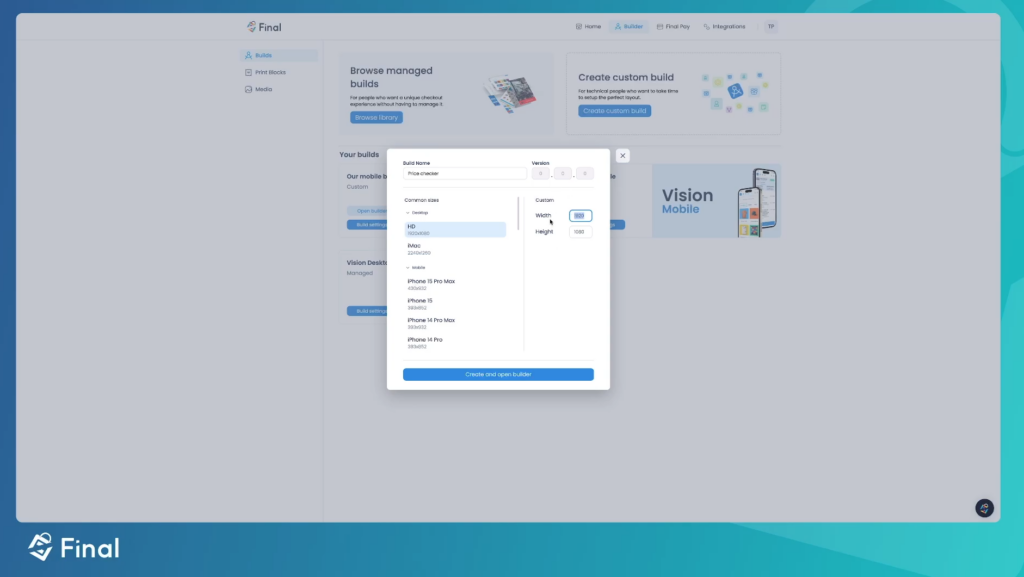
• Portrait Mode Layout: Design your kiosk screen in portrait format (1080x1920) for optimal display in a retail setting.
Step 2: Displaying Dynamic Product Data
To deliver real-time price and stock updates, Final Builder seamlessly integrates with your inventory system.
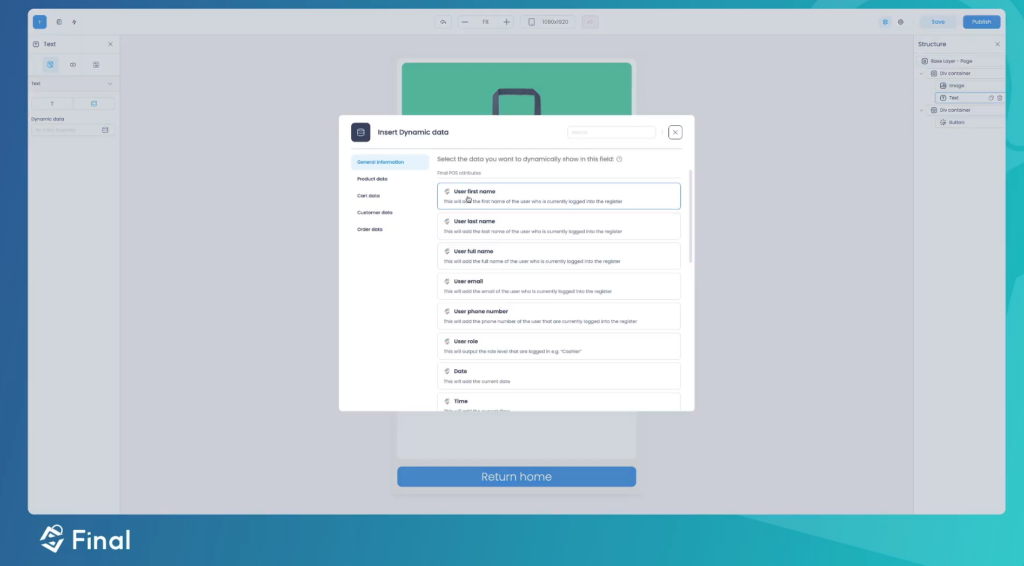
• Dynamic Product Fields: Display essential product details like:
Product Name
Price
SKU (Stock Keeping Unit)
Stock Quantity
• Automatic Data Updates: As products are scanned, the kiosk dynamically updates the product view, ensuring accuracy and speed.
Step 3: Devising User-Friendly Navigation
An efficient navigation system boosts usability and enhances the customer experience. With Final Builder, you can automate kiosk behaviour for smooth operation:
• Idle Auto-Return: If the kiosk is inactive for 60 seconds, the screen automatically returns to the home page and clears the active data.
• Dynamic Scanning: Products scanned using a barcode scanner automatically populate the product view with updated details, providing seamless navigation without manual input.
Step 4: Integrating Real-Time Price and Inventory Updates
The strength of your price check kiosk lies in its ability to deliver real-time data with precision. Final Builder enables easy backend integration for reliable updates:
• Database Connectivity: Sync your kiosk with your inventory database for up-to-date price and stock information.
• API Integration: Use REST APIs with secure protocols (HTTPS/TLS) to ensure smooth communication between the kiosk and backend systems.
• Instant Updates: Changes to product pricing or stock levels are reflected on the kiosk within seconds, offering customers the most accurate information.
Step 5: Enhancing the User Experience
A successful kiosk doesn’t just display information; it engages customers through thoughtful design and functionality.
• Interactive Feedback: Add green confirmation buttons and user-friendly messages for a smooth experience.
• Clever Synonym Matching: Allows users to find products easily with smart keyword recognition. For example, searching for “handbag” can also display “purse” or “tote.”
• Product Suggestions: Enhance shopping experiences with personalized product recommendations based on inventory.
Final allows retailers to build price-check kiosks that redefine customer service excellence. From start to finish, your journey from initial concept to finished solution is filled with all the important parts: thoughtful planning, precise hardware choices, engaging interfaces, and powerful backend systems.
Attention to detail springs to excellence. That is your success story — clear requirements, smart hardware decisions, and seamless system integration.
Our performance and real-time accuracy are delivered by our final builder's development platform with strategic implementation.
Imagine your price check kiosk as something more than a price display—the retail efficiency champion. It makes customers happy, empowers your staff, and helps drive operational excellence. The investment in good planning, development, and maintenance of your asset is a powerful one that grows with your business. There is a future in retail efficiency.
Frequently asked questions
What hardware do I need to build a price check kiosk?
A price check kiosk requires a scanner system (laser or optical), a touch-enabled display monitor, a network interface for real-time connectivity, and a mounting solution such as a wall-mounted or freestanding stand. Choosing quality components ensures reliable performance in a busy retail environment.
How does Final Builder connect the kiosk to live inventory data?
Final Builder supports database connectivity and REST API integration using secure HTTPS/TLS protocols. This allows the kiosk to sync with your inventory system so that price and stock changes are reflected on the kiosk within seconds of being updated in the backend.
What screen size and orientation should I use for a retail price check kiosk?
The article recommends designing the kiosk interface in portrait mode at 1080x1920 resolution for optimal display in a retail setting. This format suits standard freestanding or wall-mounted kiosk enclosures commonly found in stores.
How can the kiosk return to the home screen automatically?
Final Builder lets you configure an idle auto-return feature so that if the kiosk is inactive for 60 seconds, the screen automatically resets to the home page and clears any active product data. This keeps the kiosk ready for the next customer without staff intervention.
Are there legal requirements for price check kiosks in retail stores?
Requirements vary by location. The article notes that in Massachusetts, for example, retailers are required to provide one price checker for every 5,000 square feet of retail space. You should review local pricing regulations before deploying your kiosk to ensure full compliance.