



Implementing a POS System for Retail Stores: A Step-by-Step Guide
Setting up a POS system for retail stores involves more than picking software. This guide covers hardware, layout, workflows, security, and performance monitoring.
 Mathias NielsenCEO, Final POS
Retail stores lose up to 30% of their potential sales because of slow checkouts and poor inventory tracking. A good POS system can turn these problems around and boost your revenue. We know how challenging it can be to pick and set up the right system that fits your business perfectly.
Today's retail point of sale systems do much more than just ring up sales - they're detailed business management tools. We've created a step-by-step breakdown of the whole process. You'll learn everything from picking the right retail POS software to arranging your store layout and setting up secure payments. This piece will show you how to:
Choose the right hardware and software components
Create simplified processes for sales and inventory
Set up security measures and follow compliance rules
Track and improve your system's performance
Let's take a closer look at building a POS system that perfectly matches your retail business needs.
Understanding POS System Components
Understanding how a retail POS system works is vital to implementing it well. Let's look at the building blocks that create a modern pos system for retail stores.
Modern POS Infrastructure Solutions
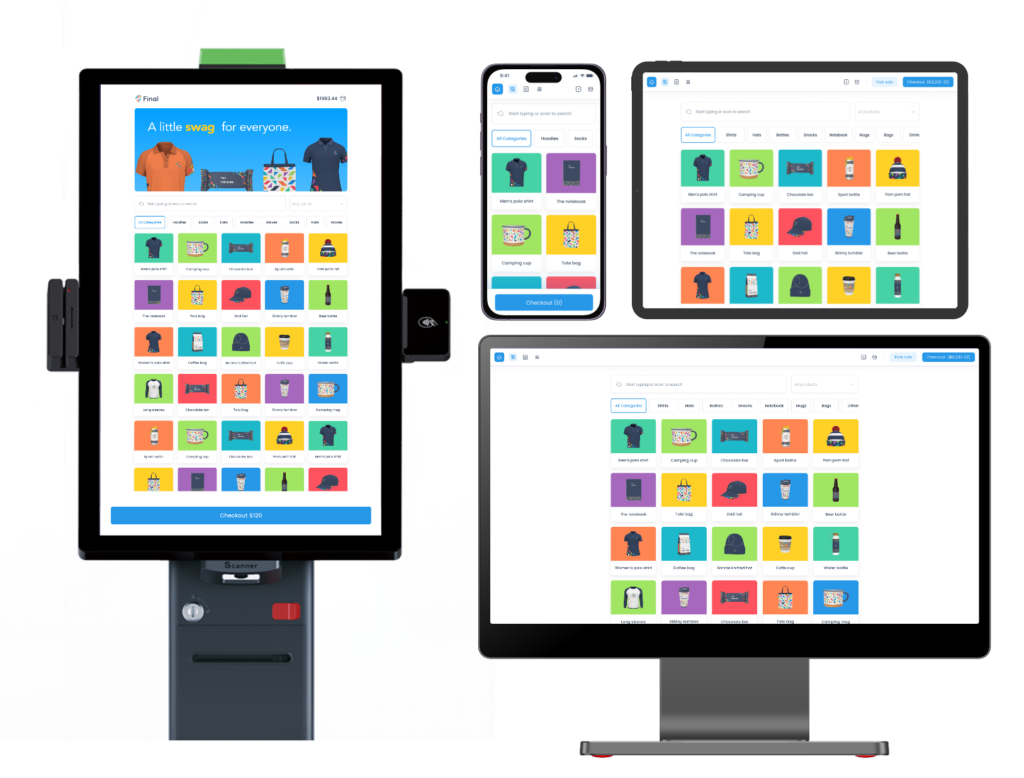
The next generation of point-of-sale infrastructure, Final POS is capable of providing unique capabilities for a personalized checkout experience. This infrastructure provides:
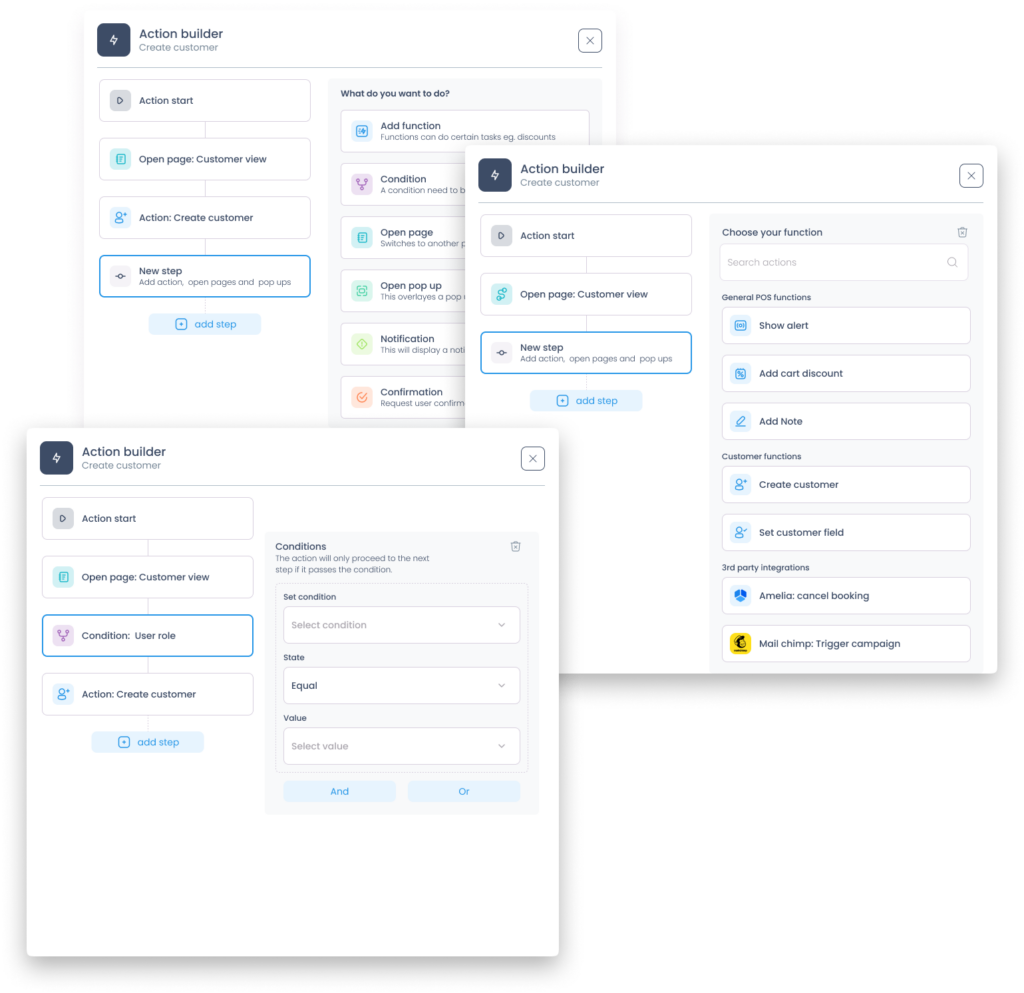
Custom checkout flow builder using drag-and-drop Pos builder
Support for Multi-device (Desktop, Mobile, Kiosk, Kitchen Display)
e-commerce platforms Inertial synchronization in real-time
Our integration with Stripe Connect enables you to have flexible payment processing.
Quick deployment of pre-built templates
Core Hardware Requirements
The right hardware components make all the difference. A reliable retail POS system needs a high-performance touchscreen monitor (17" or larger) with at least 1280x800 resolution. You'll need thermal receipt printers aswell. These printers deliver better quality and speed than dot-matrix options.
Essential Software Features
Software capabilities form the heart of point of sale systems for retail. Our experience shows that modern retail pos software must include the following:
Up-to-the-minute inventory management with automated stock alerts
Customer relationship management that delivers tailored service
Advanced security features with PIN-protected access
Detailed reporting and analytics tools
Multi-store management capabilities
Automated purchase order management
Integration Capabilities
Modern POS systems stand out because of their integration features. Your system should blend with payment processors, accounting software, and e-commerce platforms naturally. API accessibility matters for custom integrations. The system should sync data between multiple sales channels instantly.
Customer management becomes more powerful when CRM data connects with marketing tools to create tailored promotions. A good POS system makes omnichannel selling easier by keeping inventory and customer information in sync across all channels. This prevents overselling and enhances customer experience.
These three core components create the foundation for streamlined operations and flexible growth. The best approach is to pick components that work well together while staying adaptable for future expansion.
Preparing Your Retail Environment
Your pos system for retail stores needs careful planning and smart implementation. Success depends on how well you prepare.
Modern Hardware Compatibility
Today’s POS infrastructure uses various hardware configurations. Final POS, for example, works with multiple terminal options:
All in one terminal and POS – Stripe S700
Reader M2 for Bluetooth connectivity.
Mobile transactions with WisePad 3
Android & iOS devices TapToPay
Store Layout Optimization
A good store layout starts with knowing how customers move through your space. Your point of sale systems should be placed where they won't create bottlenecks during rush hours. The best spot balances customer convenience with staff efficiency. Your checkout counter needs to be available while giving a clear view of the store floor.
The best POS placement depends on:
A main checkout area next to the exit
Extra mobile POS stations for busy times
Open paths between aisles and checkouts
Enough counter space for customer items
A height that works well for your staff
Power and Network Infrastructure
A reliable power and network setup makes your retail pos software work better. Power over Ethernet (PoE) gives you a great solution by sending power and data through one cable. This makes installation easier and gives you better reliability.
Network Infrastructure Requirements:
| | | ComponentMinimum RequirementRecommended |
| Internet Speed | 10 Mbps | 50+ Mbps |
| Backup Connection | 4G/LTE | 5G/Fiber |
| Power Backup | 30 minutes | 2+ hours |
| Network Security | Firewall | UTM Solution |
Security Considerations
Physical and digital security work together. You need complete security measures that protect your hardware and data. Mount your POS system securely to stop tampering, and use strong network security to block unauthorized access.
Good security needs both physical and digital protection. This means using proper mounting for POS hardware and adding reliable security features like end-to-end encryption and secure payment processing.
Note that your infrastructure should be ready to grow. Many retailers hit roadblocks when their business expands. Build in extra capacity from the start and your system will adapt to new business needs without needing a complete change.
Customizing POS Workflows
Customization has become the main differentiator for successful pos system for retail store implementations in today's competitive retail world. Our data shows that business-specific workflow adjustments can speed up transactions by 40% and reduce staff training time.
Custom Checkout Flow Development
Modern POS infrastructures like Final enable businesses to create unique checkout experiences through:
Dynamic field configuration
Automated workflow design
Conditional logic
Custom interface layouts
Device-specific optimizations
Transaction Process Design
The first step to customization starts with transaction workflows. A business needs processes that combine smoothly with its operations. The structure of an efficient transaction process includes:
| | | Process ComponentCustomization OptionsBusiness Impact |
| Payment Methods | Multiple payment types | Increased sales |
| Receipt Design | Branded templates | Better professionalism |
| Quick Keys | Frequently used items | Faster checkouts |
| Return Protocols | Automated validation | Reduced errors |
Inventory Management Setup
Our retail pos software has changed inventory management through automated tracking and up-to-the-minute alerts. Dynamic inventory control now includes these essential features:
Automated stock alerts and purchase order generation
Up-to-the-minute visibility for multiple locations
Category-based organization with size and color variants
Advanced reporting for inventory optimization
The system tracks inventory down to the ingredient level. Your stock will never run out during peak sales periods. Low-stock alerts notify you early to maintain optimal inventory levels.
Customer Service Integration
The system's true value shines through its connection with customer relationship management capabilities. Your POS and CRM systems work together to deliver customized experiences. This connection builds complete customer profiles and tracks purchase history and communication priorities.
Customer service improvements include:
Up-to-the-minute access to customer purchase history
Integrated loyalty program management
Customized product recommendations
Automated marketing campaign triggers
Every interaction with your POS system builds stronger customer relationships while optimizing operations. The system adapts to your needs, whether you manage one store or multiple locations.
Security and Compliance Implementation
Security is the lifeblood of a successful pos system for retail store implementation. We know from experience how the right security measures protect your business and build customer trust.
Payment Security Standards
PCI DSS compliance forms the foundation of payment security. Your retail pos software will meet current standards and prepare for what lies ahead. Here's our detailed security framework:
| | | Security LayerImplementationBenefit |
| Network Security | End-to-end encryption | Protected transactions |
| Access Control | Multi-factor authentication | Unauthorized access prevention |
| Data Storage | Tokenization | Reduced breach risk |
| Monitoring | Immediate alerts | Instant threat detection |
Data Protection Measures
Our strong data protection protocols exceed simple security requirements. The point-of-sale systems for retail use advanced encryption methods to secure data both in transit and at rest. These protection measures include:
End-to-end encryption using AES 128-bit or stronger standards
Secure user authentication with role-based access controls
Regular security updates and patch management
System monitoring and threat detection that never stops

Regulatory Compliance Setup
Maintaining compliance in different jurisdictions can be complex. Your POS system will meet major regulations and adapt to future requirements. Our compliance framework covers:
Data Privacy Regulations (GDPR, CCPA)
Customer data collection protocols
Data retention policies
Privacy rights management
Industry-Specific Requirements
Payment processing standards
Transaction reporting
Audit trail maintenance
Automated compliance monitoring tools alert you to potential risks before they escalate. The system keeps detailed logs of security events to make audit compliance easier.
Our years of secure POS system implementation taught us that security builds trust. We designed security protocols that are both strong and user-friendly. Your team can maintain compliance without disrupting daily operations.
These security measures shield your business from data breaches while your retail operations run smoothly. Technical controls work together with practical usability. Your staff can focus on customers while the system handles security quietly.
Performance Monitoring and Optimization
Your pos system for retail store needs performance tracking and optimization to run at its best. We have created detailed monitoring strategies that help businesses get the most value from their POS while keeping operations smooth.
Key Performance Metrics
Your system's performance can be measured through two types of metrics that give a full picture:
| | | Metric TypeExamplesBusiness Impact |
| Quantitative KPIs | Sales volume, transaction speed, market share | Revenue tracking |
| Operational KPIs | Stock accuracy, system uptime, error rates | Process efficiency |
| Customer Service KPIs | Service speed, satisfaction rates | Experience quality |
Our retail pos software tracks these metrics and shows live insights about your store's performance. Businesses that use detailed KPI tracking usually see their operational efficiency improve by 25%.
System Health Monitoring
A reliable monitoring system keeps your point of sale systems for retail running well. Our live monitoring approach has:
Automated error alerts for failed transactions
Performance analytics tracking system speed
Network connectivity monitoring
Transaction volume tracking
Resource utilization metrics
The dashboard interface gives you instant visibility into system performance. This helps spot issues before they affect your operations. The monitoring system is both detailed and easy to use, so your team can understand and handle alerts quickly.
Optimization Strategies
Evidence-based optimization leads to continuous improvement. The strategy targets three main areas:
Regular Performance Reviews
Weekly system health checks
Monthly performance audits
Quarterly optimization assessments
Data Analysis and Reporting
Customizable reporting templates
Trend analysis and forecasting
Performance standards
Resource Allocation
Staff training optimization
Hardware upgrade planning
Software update scheduling
These optimization strategies have shown notable improvements in system performance. System metrics help identify bottlenecks and opportunities, so your POS system meets your growing business needs.
Live monitoring tools and strategic optimization practices ensure peak POS system performance. The mix of active monitoring and regular optimization reviews creates a reliable framework that keeps improving. This detailed strategy boosts system reliability and helps improve customer satisfaction and operational efficiency.
Infrastructure Scalability
Modern POS infrastructure solutions offer scalability advantages:
Multi-location synchronisation
Real-time data consistency
Cross-platform compatibility
Deployment options are customizable.
Simple setup and modi citations
Conclusion
A retail business needs secure and efficient POS systems to succeed. This piece guides you through the steps you need to reshape the scene of your retail operations with the right POS solution.
Our guide explains everything in POS implementation:
Selecting and integrating core hardware and software components
Optimizing store layout and infrastructure
Creating efficient workflows to maximize results
Setting up reliable security protocols and compliance measures
Monitoring system performance to improve continuously
These elements combine to create your own POS system that optimizes daily operations and propels development. Retailers report 30-40% efficiency gains after they implement our recommended strategies, especially when you have inventory management and checkout processes.
Your POS system is a vital part of your retail operations. It connects every aspect of your business from inventory to customer relationships. A careful plan and implementation builds a foundation that supports your current needs and stays flexible enough for future expansion.
Note that a successful POS implementation needs constant attention to system performance, security updates, and staff training. Quarterly reviews of your system's performance metrics help identify optimization opportunities and ensure your POS serves your business effectively.
Frequently asked questions
What hardware do I need for a retail POS system?
A retail POS system typically requires a high-performance touchscreen monitor (17" or larger with at least 1280x800 resolution) and a thermal receipt printer. Depending on your setup, you may also need mobile readers for Bluetooth or tap-to-pay transactions. Choosing compatible hardware from the start helps avoid costly upgrades later.
How do I make my retail POS system secure and PCI compliant?
PCI DSS compliance is the foundation of payment security for any retail POS. This includes end-to-end encryption (AES 128-bit or stronger), multi-factor authentication, tokenization for data storage, and continuous system monitoring. Automated compliance tools can alert you to risks before they become problems.
How can I customize POS workflows for my retail store?
Modern POS platforms let you configure dynamic checkout fields, set up conditional logic, design branded receipt templates, and assign quick keys for frequently sold items. These customizations can speed up transactions significantly and reduce the time needed to train new staff.
What internet speed does a retail POS system require?
A minimum internet speed of 10 Mbps is needed to run a retail POS system, though 50 Mbps or more is recommended for reliable performance. A backup connection such as 4G/LTE or 5G is also advisable to keep operations running if your primary connection goes down.
How does a POS system help with retail inventory management?
A retail POS system can automate stock tracking, send low-stock alerts, and generate purchase orders automatically. It can track inventory across multiple locations in real time and organize products by category, size, or color variant, helping prevent stockouts during peak sales periods.