



Smarter Employee Management with Your POS System
Modern POS systems do more than process sales — they help you manage staff with PIN logins, shift logs, role-based access, and real-time performance reports.
 Mathias NielsenCEO, Final POS
Point of Sale systems (POS) have come a long way. What used to be simple cash registers are now intelligent platforms that power everything from sales to inventory, and increasingly, employee management.
Modern POS systems, like Final POS, are more than just about completing transactions. They function as operational hubs that help reduce errors, enforce accountability, and improve insights. Final POS gives you the power to control access, track performance, and manage staff across all touchpoints—without the complexity.
Whether you run a franchise, operate a multi-store retail business, or build POS solutions for clients, smarter employee management software is the key to smoother operations and sustained growth.
Let's explore how POS-based employee tools can improve daily operations and long-term performance across your business.
From Sales Terminal to Employee Management solution
The evolution of the POS system has transformed it into the nerve center of business operations. Beyond ringing up sales, a good POS platform should support detailed employee oversight, secure logins, shift tracking, and performance reporting.
*This shift has real advantages for businesses that:*
Share devices between multiple employees
Run operations at several locations
Need insights into staff performance
Must follow policies and want to avoid risks
In short, if you're wondering "how do I track employees in my POS system?" - this is how:
Secure Access with PIN Logins
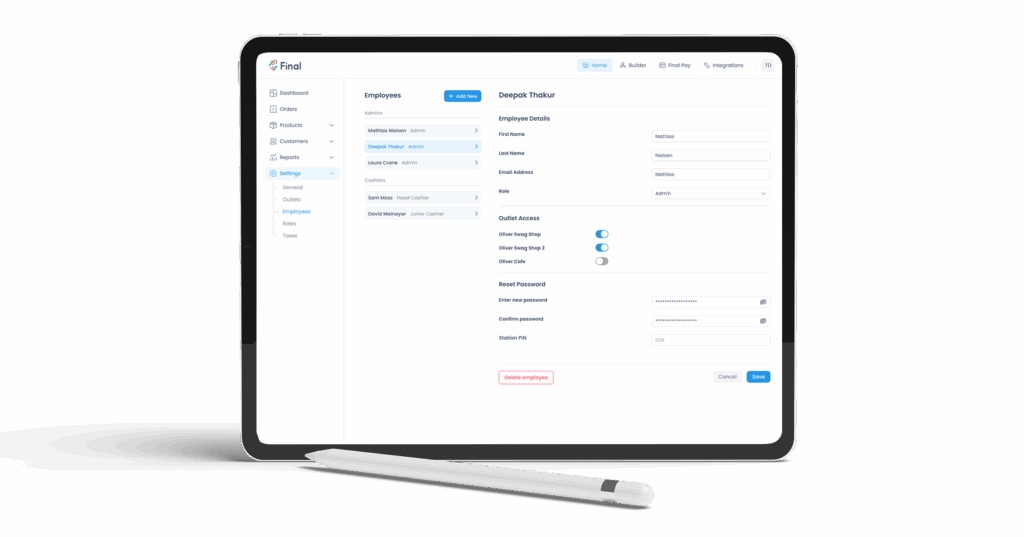
The first tool for managing employees through a POS system we'll cover is PIN login. A quick and straightforward way to ensure accountability is assigning each staff member a unique and secure PIN.
With Final POS, team leaders can assign and manage PINs through Final Manage without hassle. Whether a cashier clocks in for their shift or a manager checks end-of-day totals, all actions connect to individual profiles, helping maintain complete transparency for the team.
Benefits of PIN login in POS systems?:
Restrict access to authorized users only
Lock down sensitive actions like refunds, voids, and discounts
Track staff activity accurately for reporting and accountability
So the reason each staff member should have a unique PIN login is to reduce internal errors, improve audit trails, and build a culture of trust and responsibility as recommended by digital authentication guidelines.
Shift Logs and End-of-Day Accountability
Another feature of POS employee management is the built-in shift log. Knowing who starts or ends a shift clarifies accountability and eases any mix-ups during staff transitions.
With Final POS, every shift gets logged automatically. You can always see who started or ended the shift, who handled cash adjustments, and what was noted during handovers. This detailed tracking builds a dependable employee audit record making reviews easier, fixing errors quicker, and keeping processes consistent from one shift to the next.
Advantages of POS shift logging:
A complete overview of who opened and closed each shift
Notes from staff about any issues during their shift
Exact cash drawer status at the beginning and end of the day
This kind of transparency simplifies handovers, improves internal communication, and helps maintain operational control, even during peak hours or across long operating days.
Track Staff Performance with Real-Time POS Data
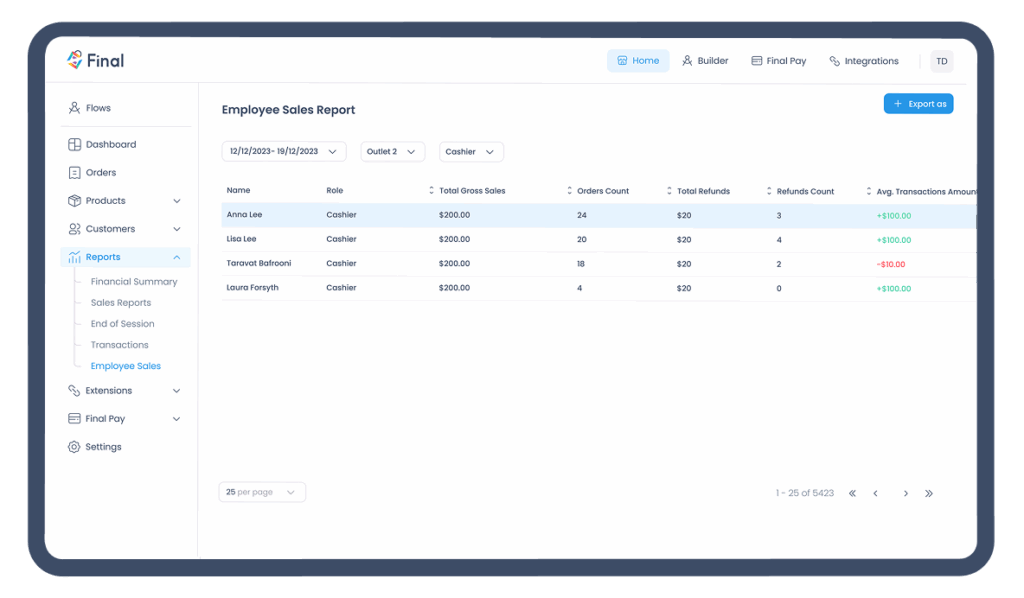
Beyond secure access and shift control, your POS system should help you understand how each team member is performing. Final POS offers employee-level reports to make staff management or retail employee management more straightforward and reliant on data insights.
How to track individual employee sales with your POS system
Every transaction is linked to a specific user profile, giving you a clear picture of how your team operates, individually and as a whole, for employee performance tracking. Final Manage lets you track important stats for each team member, such as:
Name and role
Total gross sales
Order count
Total refunds processed
Average transaction value
Total tips earned
This type of staff-level POS tracking makes it easy to spot high performers, detect unusual patterns, and support better decision-making around training, scheduling, and incentives as shown in research on data-driven employee engagement. To understand how these figures roll up into your overall business performance, see How to read your Financial Summary.
Benefits of employee-level POS reporting:
Monitor sales and service metrics per staff member
Spot performance trends across time, locations, or roles
Identify where coaching or recognition is needed
Support commission and bonus programs with reliable data
Improve operational consistency through smarter staffing
Whether you're running a retail store, café, or salon, having POS employee reporting at your fingertips helps you align operations with goals, improve accountability, and build a performance-focused team culture.
Check out more details on Final POS reports here.
Role-Based Access and Permissions
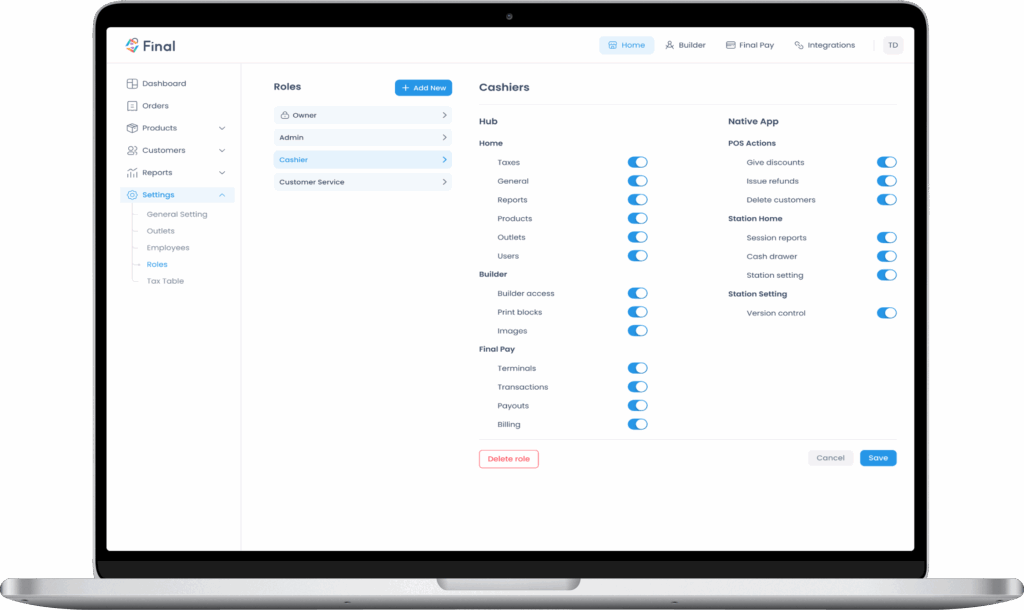
Not every employee needs access to every part of your POS system. Role-based permissions fix that. With Final POS, you can define exactly what each role, for example, cashier, supervisor, and admin, can see and do.
By tailoring access levels to specific job responsibilities, you protect sensitive functions and reduce operational risk, all while keeping the POS system easy to use for your frontline team.
*Here's an example:*
Cashiers handle sales and check ongoing orders.
Supervisors approve refunds, apply discounts, and look at reports.
Admins manage employees, adjust product settings, and view all reports.
But why use role-based permissions? This kind of POS role-based access helps maintain internal control and ensures your policies are enforced consistently, no matter how large your team is. Keeping your product catalog organized by role also helps—see How to organize products with categories for a practical guide.
Benefits of customized staff permissions:
Limit access to sensitive features like refunds, discounts, or reports
Reduce human error and misuse of system functions
Simplify the interface for non-technical users
Maintain compliance with company protocols
Scale access easily as your team grows
With user-level control in your POS, you give your team just what they need to do their jobs.
Multi-Location Employee Management and Oversight
This topic came up earlier, but it deserves more attention. Employee performance management at different locations can feel complicated, you may wonder, "what's the best POS system for managing employees across locations?". The answer is one with centralized visibility, like Final POS. Final POS gives you centralized employee monitoring across all stores, helping you maintain consistency, control, and clarity no matter where your team operates. Read more here.
Advantages of overseeing staff at multiple locations:
Ensure consistent employee policies across locations
Benchmark store performance and staffing efficiency
Spot patterns or outliers in staff behavior
Simplify reporting and reduce admin work across your network
When staff payments are involved across locations, understanding how funds move is equally important—visit Payouts, Balances & Funding for details on how Final Pay handles disbursements.
Better Staff Management Starts with Your POS
Employee Management with your POS System is essential for building transparency, trust, and operational consistency. From secure PIN logins and shift logs to real-time performance data and role-based access, your POS system should give you the tools to manage your team with confidence.
Final POS is built to do just that. With flexible, built-in employee management features across roles, shifts, and locations, you get full control without adding complexity to your daily operations. Get started with Final POS today.
Frequently asked questions
What is POS-based employee tracking?
POS-based employee tracking allows businesses to monitor actions and performance per team member by linking activities (like transactions, refunds, or shifts) to individual logins. This improves transparency and accountability.
Can I control who sees what in my POS system?
Yes. With Final POS, you can create role-based access controls that define what each team member can see or do based on their role—cashier, supervisor, admin, etc.
Why should each staff member have a unique PIN?
Unique PINs link every action to a specific person, making it easier to monitor access, prevent misuse, and maintain secure audit trails.
Can I manage employees across multiple stores with Final POS?
Absolutely. Final POS provides centralized tools for monitoring employee activity across multiple locations, allowing you to enforce consistent policies and view reports from a single dashboard.