


Should You Build a Kitchen Display System? Requirements and Options
Building a ticket grid in an AI app generator takes minutes, but surviving a Friday night kitchen rush requires composite order routing, recall queues, offline resilience, and heat-tolerant hardware. Here is what a production KDS actually needs.
 Mathias NielsenCEO, Final POS
Generating a grid of order cards in a browser takes about three prompts in any general-purpose AI coding tool. Ask for a dark-mode ticket queue with green, yellow, and red timers, and 45 seconds later you have a handsome preview on your laptop. Then you mount that app five feet from a 450-degree fryer on a Friday night. The restaurant's internet hiccups during a 60-seat rush, and a composite burger combo fails to split between the grill screen and the bar printer.
When makers decide to build a kitchen display system (KDS), they usually budget time for the interface and underestimate the plumbing. A KDS is one piece of the wider challenge of connecting POS hardware to custom apps, where a clean browser prototype meets heat, grease, local networks, and multi-station routing. Before you spend two weeks wiring WebSockets and local state caches from scratch, take stock of what a kitchen screen actually has to survive.
What Does a KDS Do Beyond Showing Orders?
A kitchen display system is a real-time production router and state machine that coordinates food and drink preparation across physical stations in a hospitality business. Treat it as a read-only dashboard that just lists recent orders, and you'll get yelled at by a head chef on night one.
Paper tickets remain popular with line cooks because of basic physics. You can stab a paper chit onto a spindle, slide it along a metal rail, scribble on it with a Sharpie, and read it when the router dies. A digital screen has to earn its place on the line by doing things paper can't without losing the speed of a physical rail:
Item-level state tracking: An order rarely finishes all at once. The appetizer leaves in six minutes, drinks leave in two, and entrées fire ten minutes later. Track status per line item, not just per receipt.
Modifier hierarchy and allergies: If someone orders a burger with no gluten, extra pickles, and salad dressing on the side, don't display a flat comma-separated string. Indent and highlight modifiers beneath the parent item so a cook scanning from four feet away never misses an allergy flag.
Live order mutations: Customers change their minds at the register, or a server adds a side of fries to an open table two minutes after sending the main ticket. Your KDS has to update that active ticket in place and flag the change visually. Burying a separate single-item ticket at the end of the queue breaks the table's timing.
All-day counts: During a rush, the grill cook isn't going to count ribeyes across 14 open tickets. They look at a persistent sidebar tally reading "8 Ribeye (3 Rare, 4 Med-Rare, 1 Well)" and drop the meat.
Real-Time Order Routing by Station
TL;DR: Station routing inspects categories and composite product rules the moment a sale is rung up, splitting a single checkout cart into targeted payloads for specific kitchen screens and thermal printers.

Category and composite routing automatically splits a single checkout combo into separate jobs for the bar printer, grill screen, and fry station.
In a tiny coffee shop, one screen shows everything. In a 60-seat restaurant or a busy bar, showing every item on every screen creates visual noise that slows down the line. Bartenders shouldn't have to scroll past 12 orders of garlic bread to see two draft beers.
When you build a kitchen display system for a real service floor, routing happens at the category and component level, not the order level. Inside Final, you assign multi-printer routing tags on a registered Native Station to match physical prep zones. Standard setups use tag pairs like counter and kitchen for quick-service, counter and bar for pubs, or counter, kitchen, and bar for full-service dining.
Composite products are where custom apps usually break. Say a customer orders a "Lunch Combo" with a smash burger, seasoned fries, and a pint of lager. In the checkout catalog, that's one SKU with one price. In the kitchen, it's three separate jobs:
The pint of lager routes to the
barthermal printer or bar display.The smash burger routes to the hot line KDS tagged
kitchen.If the fryers sit away from the flat top, the fries route to the fry station based on their sub-category.
When you set up a composite product in Manage, each component inside the combo inherits routing from its own category. The kitchen gets the exact tickets for each part of the order automatically. If you're building your own KDS database schema in a generic AI coding tool, you'll have to build a junction table for composite explosions and run that splitting logic on every transaction before emitting events to your station screens.
Bump, Recall, and Timers: The Line Cook's Interface
Cooks don't use software like office workers. Their hands are wet, dusted with flour, or wrapped in greasy nitrile gloves. They don't pinch-to-zoom or open dropdown menus, and they will beat a fragile UI with metal tongs if a button refuses to register.

Kitchen interfaces need large, responsive tap targets or physical bump bars designed for gloved hands during a rush.
A working kitchen display app relies on three core interactions:
1. Single-tap bump (and hardware bump bars)
Clearing an item or a whole ticket from the screen is called "bumping." On a touchscreen KDS, the tap target needs to be massive—at least 60 by 60 pixels—with instant visual feedback. Many high-volume kitchens skip touchscreens altogether because grease ruins capacitive touch response over time. They mount the screen out of reach above the pass and plug in a physical USB or serial keypad called a bump bar. If you write a custom web app, you have to map numeric keycodes from an industrial USB bump bar to specific ticket slots in your grid.
2. Instant recall with an audit trail
Every cook bumps the wrong ticket at least once a shift. An elbow brushes the glass, or someone double-taps when the system lags for half a second. If that ticket vanishes into a backend database without a one-tap "Recall" drawer right on the KDS screen, the kitchen grinds to a halt while someone walks out front to ask for a reprint. Recall must pull back recently bumped tickets in reverse chronological order and restore them to their original timer position.
3. Threshold timers and audio alerts
A timestamp showing "Ordered at 7:14 PM" forces the cook to do mental math. Display elapsed time (04:12) instead, shifting card borders through configurable thresholds: neutral up to 5 minutes, amber at 8 minutes, and flashing red at 12 minutes. Pair those visual timers with local audio chimes loud enough to cut through hood fans when a new order or rush VIP ticket lands.
What Happens When the Kitchen Wi-Fi Drops?
Walk into the back of any older restaurant building and look at the walls: stainless steel cladding, walk-in cooler compressors, thick masonry, and commercial microwaves. It is a nightmare environment for consumer Wi-Fi.
Build your custom KDS as a standard cloud web app, and here is what happens: the cashier rings up an order at the front counter, the iPad sends an HTTPS POST to a cloud server in Virginia, and that server pushes a WebSocket event back down to the kitchen screen twenty feet away. When the restaurant's ISP drops for four minutes during a thunderstorm, the front counter queues the order or throws an error while the kitchen screen sits blank.
A production KDS has to work over the local area network (LAN) and survive offline gaps. Register a Native Station in Final Station (rather than a browser-based Virtual Station, which we only recommend for pop-ups, staff training, or back-office tasks), and the app talks directly to local hardware so you keep operating when internet connectivity stutters. Roll your own KDS, and you'll need either a local network message broker running on an in-store device or a peer-to-peer sync protocol between the register and the kitchen display.
Hardware Realities: Screens, Mounts, and Heat
Consumer tablets are built for living room couches at 70 degrees Fahrenheit. Mount an off-the-shelf tablet directly above a salamander broiler or next to a commercial dishwasher, and two things happen: the lithium-ion battery swells from continuous thermal stress while plugged in 16 hours a day, and steam works its way behind the glass.

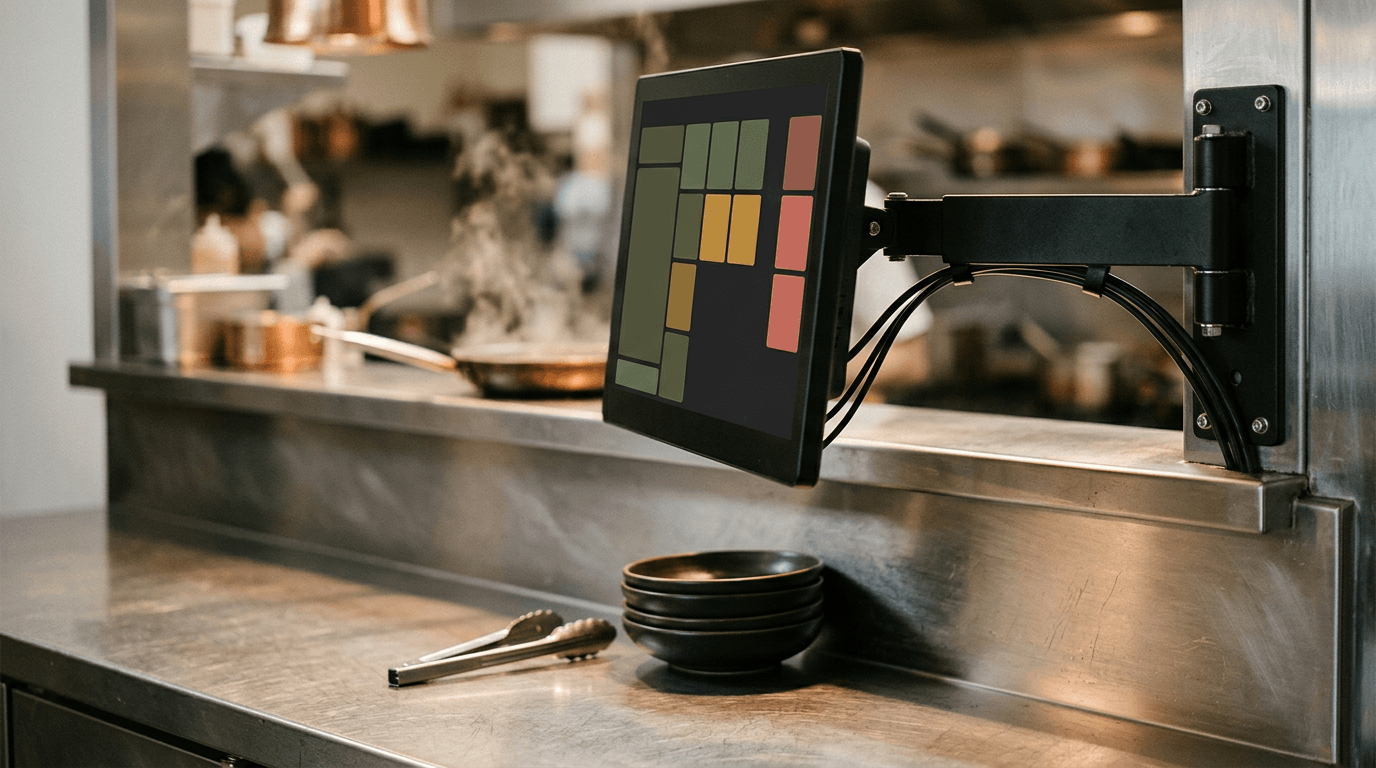
Purpose-built KDS hardware uses VESA arm mounts, enclosed cable routing, and hardwired networking to keep counters clear and connections stable.
Consumer tablets fall short of purpose-built commercial KDS units in three ways:
Screen size and viewing distance: A 10-inch tablet works fine at a cramped coffee bar where the barista stands 18 inches away. On a restaurant line, cooks stand three to six feet back across a stainless prep table. You need a 15.6-inch or 22-inch full HD panel so 10 tickets can sit side-by-side at a readable font size.
Power and networking: Kitchens need hardwired Ethernet (ideally with Power over Ethernet, or PoE) or locked power connectors that won't shake loose when someone slams a reach-in fridge door.
Mounting: Counter space in a kitchen is scarce and expensive. A KDS belongs on a VESA wall mount or an articulating arm stand clamped to the pass shelf, with cabling routed inside the arm to keep it out of the food prep zone.
We offer Final KDS in two commercial sizes: a 15.6-inch FHD hexa-core display and a 22-inch FHD octa-core display, each with 4GB of RAM and 64GB of storage. Every Final KDS ships as a complete kit with an articulating arm stand and cabling included, bought outright at the listed price with no monthly device fees. See the full breakdown of how hardware ownership works in how Final POS pricing works.
Customizing Your KDS Workflow in Final Without Reinventing the Plumbing
People usually try to build a kitchen display system from scratch because they are fed up with rigid POS software. Restaurant owners get tired of systems that force every kitchen into the same ticket layout, tack on monthly fees per screen, or require a support ticket just to change how combo modifiers print.
You should control how your screens look, what buttons your staff tap, and how conditional logic routes orders. You shouldn't have to write the low-level hardware bridges, composite category splitters, and offline queues yourself.
Final is the world's most customizable POS. Using Flow Studio, makers and merchants customize every step of the checkout and operational experience. Most merchants start from a ready-made flow in the Flow Library and adjust it to match their service style, or describe their workflow in Flow Studio so it builds the flow from their prompt.
Because Flow Studio builds directly on Final's commerce rails, your custom flow inherits working kitchen infrastructure right away:
Catalog and composite wiring: Products, variants, modifiers, and composite bundles configured in Manage automatically carry their category routing tags.
Unlimited Stations at $0/month: There is no plan or tier to choose, and no monthly software fee on Final, with unlimited Stations and Outlets. Adding a second screen for the pastry station or the bar doesn't bump you into a higher subscription tier.
Hybrid printer and screen setups: Most kitchens don't go 100% screen-only overnight. Often the hot line uses Final KDS while the bar and expeditor still want a physical thermal paper chit from Final Print to tape to a takeaway bag. Because a registered Native Station supports multi-printer routing by tag alongside display workflows, you can mix screens and thermal printers in the same Outlet.
Open Flow Studio, pull a hospitality flow from the Flow Library, and test your category routing rules with your own menu items. You get 1,000 free build credits every day (up to 5,000 a month) to customize every screen, and you can deploy the finished app straight to a Final KDS or the tablets you already own in minutes.
Frequently asked questions
What is a kitchen display system?
A kitchen display system (KDS) is a digital screen mounted in a food or drink prep area that replaces or works alongside printed kitchen tickets. It routes ordered items to specific prep stations, tracks prep times with color-coded timers, and lets cooks bump finished items or recall bumped tickets with a single tap.
Can I build my own KDS?
Yes, though the hardest engineering problems hide underneath the screen layout. A working kitchen display app has to split composite combo products across multiple stations by category, handle live order modifications in place, and run on a local network or native station setup that survives Wi-Fi drops.
Does a KDS need special hardware?
Any tablet or screen can run a KDS in a low-heat spot like a coffee counter, as long as it's registered as a Native Station when connected hardware is required. For busy commercial kitchens with heat, steam, and longer viewing distances, restaurants usually mount 15.6-inch or 22-inch displays like Final KDS using articulating arm stands.