



Payment Flexibility Across Final Builder, Station, and Hub
Final delivers payment flexibility across Builder, Station, and Hub—letting agencies build custom checkout flows, support multiple hardware types, and track every transaction.
 Mathias NielsenCEO, Final POS
If you’re building POS solutions for multiple clients, you know the pain. Every business wants payment flexibility and a different checkout setup, and you’re stuck hardcoding workflows or duct-taping APIs to make it work. Regardless of their size, every client expects a checkout experience that just works, with their preferred payment methods, devices, and branding.
Final provides you with a comprehensive infrastructure to deliver exactly that—a customized payment solution designed for scalability, speed, and complete control. Whether you’re crafting flexible payment workflows in Builder, facilitating smooth in-store transactions on Final Station, or monitoring performance and payments in Hub, you have a platform that adjusts to your clients' needs, not the other way around.
Payment Elements in Builder
In Final Builder, you can create custom payment workflows using a simple drag-and-drop interface. You get full control over the checkout process—so whether you're dealing with unique payment methods or want the checkout to match your client’s brand perfectly, there's no need for custom coding.
This kind of payment flexibility is a huge advantage, especially for resellers and developers juggling different industries, client types, or regional needs.
Here’s how the Payment Elements in Builder help you shape checkout flows, create new revenue opportunities, and build a customized POS experience your clients will genuinely enjoy using.

Available Payment Elements:
These are elements you can add directly to any checkout flow:
Final – Terminal: Add traditional payment terminals for in-store checkout.
Final – Tap to Pay: Enable contactless payments directly through mobile or tablet devices.
Cash button: Include a cash payment button, with support for cash drawer handling and session management.
Custom Payments
When it comes to payment options, you can also create custom payments such as Cheque, Store Credit, or Wallets. These options can be renamed per client, tracked in reports, and blended seamlessly into checkout flows. This ensures clients get the payment flexibility they expect while maintaining operational consistency.
Payment Grid Element
The Payment Grid is a handy layout component designed to arrange various payment options within the checkout interface. It provides a clean and user-friendly experience, whether a client is using just one payment method or a combination of cash, card, and custom options. This enhances usability for both staff and customers, making it a crucial part of delivering a payment solution that truly works in real-world scenarios.
Why it matters
Builder equips you with the tools to set up scalable and flexible payment setups without the hassle of juggling different versions for each client. This means you can enjoy:
Faster rollout across projects
Easy reuse of components for different business types
Custom branding and white-labeling options
Reduced maintenance and increased scalability
But the best part? Final empowers you to provide a fully customized payment solution that adapts to your clients’ specific needs — whether that’s hardware terminals, tap-to-pay, cash handling, or even alternative methods like cheque or store credit.
With Final, you get a POS infrastructure that adjusts to each client, not the other way around.
Payments on Final Station
Once a payment flow is built in Final’s Builder, it becomes instantly available in Final Station — the POS interface used by staff at the counter, on mobile, or in kiosk setups.
This ensures that what you design centrally in Builder is reflected consistently across all client touchpoints, with full hardware support and real-time functionality. In short, this ensures a consistent, real-time experience across all client touchpoints.
Seamless Hardware Integration
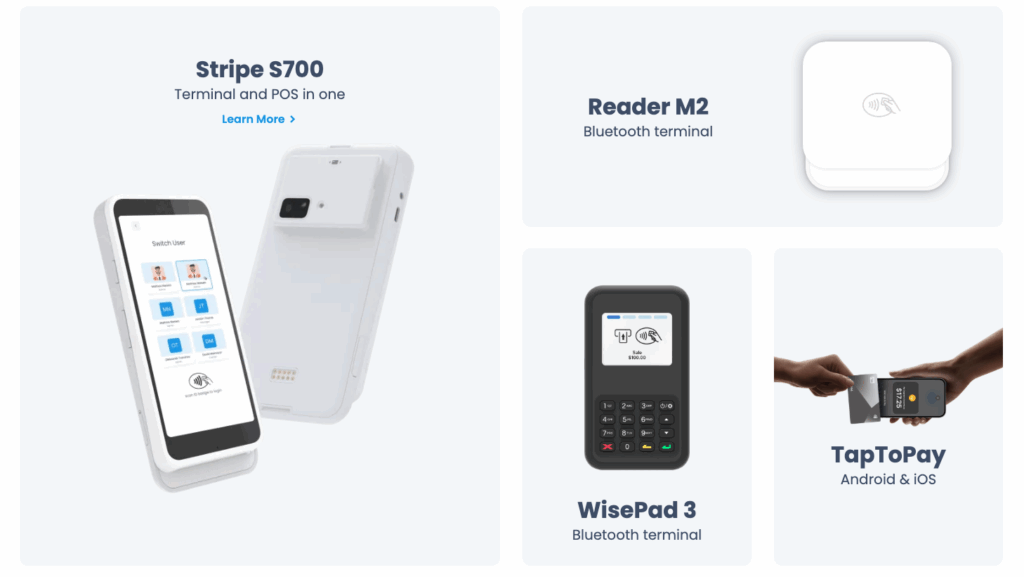
As mentioned earlier, we offer different Payment Elements in Builder. These are components you can add directly to any checkout flow, and they will appear in the Final Station app. This means Final Station supports both Bluetooth and cloud-based terminals, as well as Tap to Pay, making it easy to accept in-person card payments in any setup.
Whether your clients prefer the flexibility of mobile devices or the stability of fixed hardware, they can choose the element that fits their environment, with no compromise on payment flexibility.
Cloud Terminals – Perfect for mobile or tablet-based POS flows, cloud terminals are quick to deploy and easy to scale across multiple locations.
The S700 terminal is a powerful, all-in-one device with a built-in receipt printer — ideal for high-volume countertop setups. It supports both contactless and chip card payments and integrates seamlessly with Final POS.
Bluetooth Readers – Great for countertop checkouts and situations where direct, stable pairing is preferred.
One flexible mobile card reader that integrates easily with Final Payments and Final POS is the Stripe Reader M2. It supports contactless, magstripe, and EMV chip card payments.
The BBPOS WisePad 3 is a compact, lightweight, and secure card reader that pairs effortlessly with Final POS. Its end-to-end encryption and tap-to-pay support make it a perfect fit for mobile-first or hybrid setups.
Final – Tap to Pay – Accept contactless payments directly on any mobile or tablet device. Available on both iOS and Android, it’s a hardware-free way to turn smart devices into secure, flexible POS terminals.
Read more about the powerful hardware options to complement your custom point of sale here.
Cash Drawer and Manual Payment Handling
For those clients who still deal with cash, Final Station offers comprehensive cash drawer support, which includes:
Tracking the opening float
Keeping cash-in/cash-out logs
Entering manual transactions (like adjustments, refunds, and more)
Facilitating split payments, so multiple payment types can be used in a single transaction
This level of detail guarantees that every transaction is recorded accurately, giving your clients complete control over in-store payments.
Payment Reporting in Hub
Final Hub offers a complete overview of payment data across all checkout flows, giving resellers and their merchants a clear, accurate view of business performance, right down to the transaction level.
Once payments are processed through Final Station, all transaction data is automatically recorded and made accessible inside Final Hub — your clients’ branded back office for tracking sales and performance.
Final Hub includes a complete set of payment reporting tools, helping merchants stay informed without relying on external systems or manual exports.
Whether you're clients are managing smaller shops or a multi-location franchise network, Hub provides the transparency and control needed to manage daily operations and long-term strategy.
Available Report Types
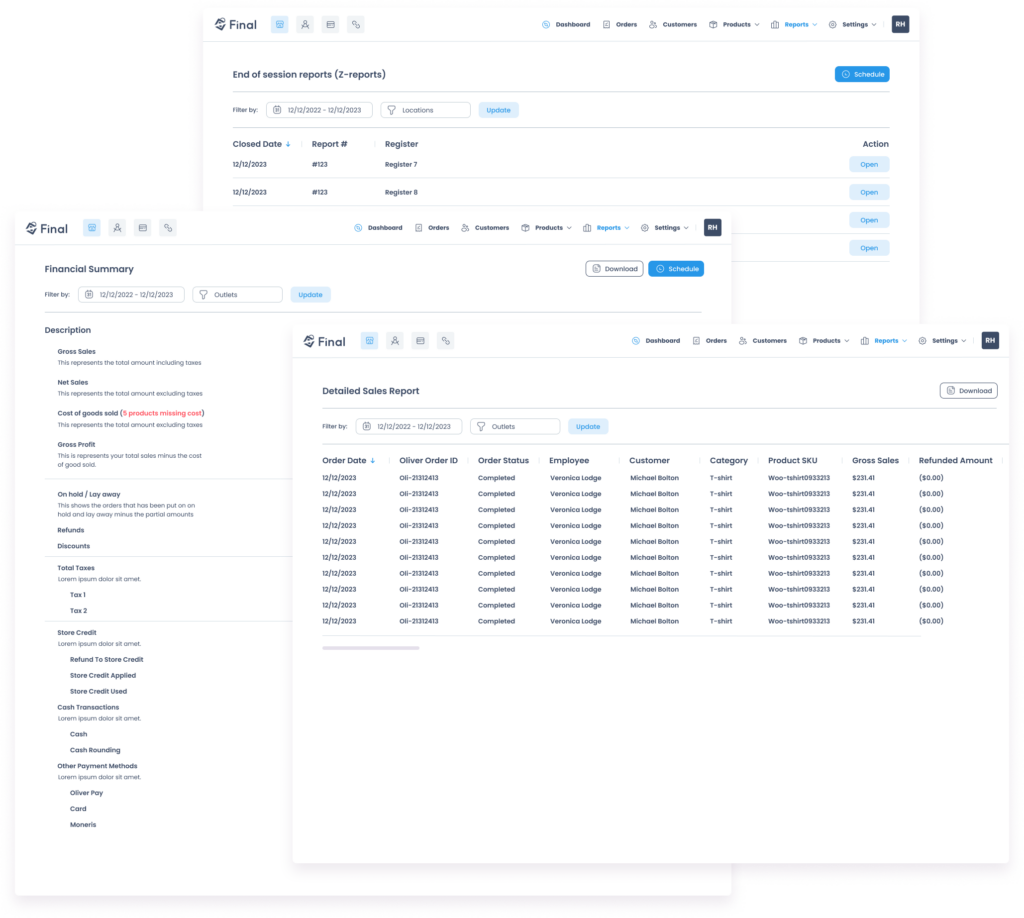
Payments Summary – Breakdown of transactions by payment type: card, cash, Final Pay, or any custom method configured in the Builder.
Fees Summary – Overview of all product and cart-level fees applied during checkout.
Session Reports – Detailed register-level reporting for staff and station reconciliation, including float handling and cash activity.
End-of-Session (Z-Report) – a breakdown of daily transactions ready to print daily for shift or store managers.
Employee Sales – Keep an eye on how your employees are doing, tracking their sales volume, refunds, and discounts.
Financial Summary & Sales Report – a clear revenue overview with full visibility into gross/net sales, tax, refunds, and custom sale data.
Cash Ledger & Store Credit – Log of all cash adjustments and usage of wallet/store credit balances.
Built for Scalable Payment Solutions
Payment reporting in Hub isn’t just about data — it’s about clarity. Whether your client uses a single cash drawer or a mix of terminals and custom payment types, Final organizes everything automatically.
It’s one more way Final supports you in delivering a complete, customized payment solution that scales, from single stores to multi-location businesses.
Conclusion: Build your customized payment solution with Final
Final’s payment infrastructure is all about providing flexibility, control, and scalability to cater to a diverse array of clients.
What’s even better is that Final equips you with the tools to create a fully customized payment solution for your clients—one that aligns perfectly with their specific needs, accommodates their preferred payment methods, and evolves alongside their business.
Whether you’re setting up payment workflows in Builder, facilitating seamless in-person transactions on Final Station, or diving into detailed insights in Hub, you have all the essentials to offer a cutting-edge POS experience.
Explore payments with Final here.
Earn on Payment Processing with One Click
Final makes it effortless for your agency or platform to monetize payment flows. With built-in Stripe Connect integration, you can enable seamless payment facilitation and instantly set your own processing rates. That’s right—onboard sub-merchants, control their transaction fees, and start earning on every sale, all from within a user-friendly dashboard.
Talk to an expert to get started.

Frequently asked questions
What payment methods can I configure in Final Builder?
In Final Builder, you can add terminal payments, Tap to Pay, and cash buttons using a drag-and-drop interface. You can also create custom payment types such as cheque, store credit, or wallets, which can be renamed per client and tracked in reports.
Which hardware does Final Station support for in-person payments?
Final Station supports cloud terminals like the S700, Bluetooth readers like the Stripe Reader M2 and BBPOS WisePad 3, and Tap to Pay on both iOS and Android devices. This gives merchants the flexibility to choose fixed or mobile hardware depending on their setup.
How does Final Hub handle payment reporting?
Final Hub automatically records all transaction data processed through Final Station and organizes it into reports including Payments Summary, Session Reports, Z-Reports, Employee Sales, and a Cash Ledger. This gives merchants full visibility without needing external tools or manual exports.
Can Final support split payments and cash drawer management?
Yes. Final Station includes comprehensive cash drawer support, including float tracking, cash-in/cash-out logs, manual transaction entries, and split payments that allow multiple payment types within a single transaction.
How can agencies earn revenue from payment processing with Final?
Final includes built-in Stripe Connect integration that lets agencies set their own processing rates, onboard sub-merchants, and earn on every transaction processed through their clients' POS flows—all managed from within the Final dashboard.