



Custom Checkout Flows that Match Any Brand, Workflow, or Device
Generic POS checkouts no longer cut it. Learn how modular infrastructure lets you build custom checkout flows for any brand, device, or industry.
 Mathias NielsenCEO, Final POS
Let’s face it — the era of generic one-size-fits-all POS is over. Today’s businesses aren’t looking for cookie-cutter checkouts. They want a checkout flow that matches their brand, their workflow, and the devices they operate on.
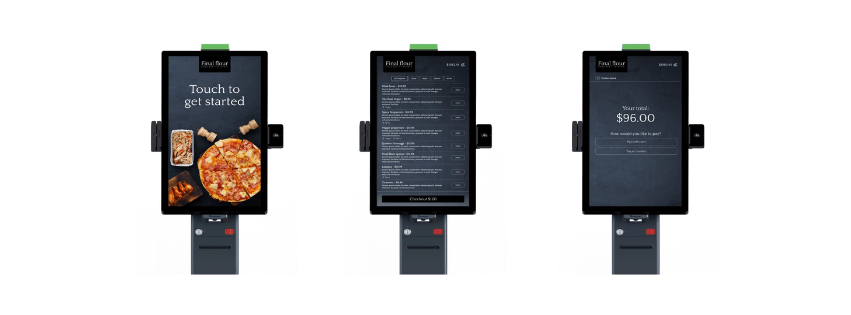
Whether it’s a pizza chain handling hundreds of lunch orders through kiosks or a boutique coffee brand offering table-side tablet checkout, modern retailers expect tech that adapts to their workflows, not the other way around. And increasingly, they’re asking their tech partners to deliver just that.
For agencies and resellers, that means more pressure to build custom checkout flows — without creating a nightmare of complexity to manage. This post breaks down how modern, modular checkout infrastructure makes that possible.
The Power of Custom Checkout Flows
Now that we’ve established that the future of checkout is custom, the next question is: What actually makes a flow “custom”?
Spoiler alert — it’s not just the visuals. Yes, branding matters (and we’ll never neglect that), but real custom checkout flows go far deeper.
We’re talking about the ability to tailor how the checkout behaves based on your client’s needs. That includes payment types, PIN logic, employee permissions, device-specific layouts, kiosk modes, fees, taxes, discounts — all of it.
A few examples:
QSR kiosk: Tap to Pay + upsell buttons + order summary
Retail tablet: Staff login + product notes + discount controls
Mobile POS: Custom sale + fast fee input + tip toggle
This means that if your POS infrastructure supports true customization, you no longer have to operate within rigid, one-size-fits-all frameworks. Instead, you can deliver custom checkout flows that feel tailor-made and adapt to how each business runs.
Build & Deploy Everywhere
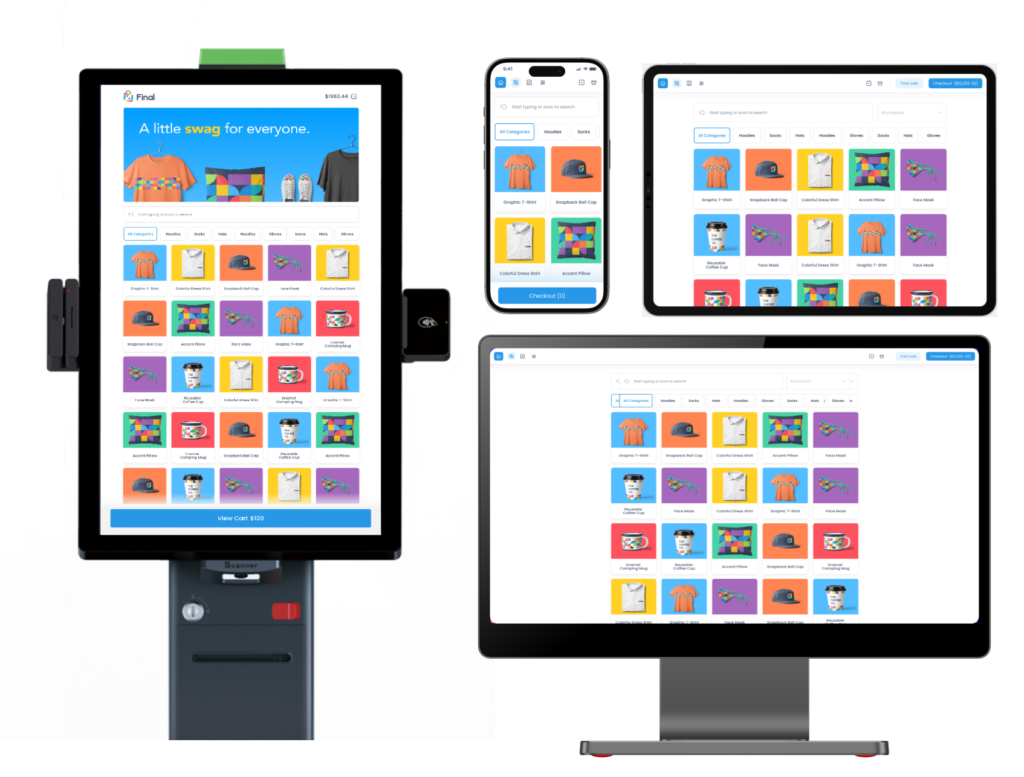
Retailers want flexibility, and many modern businesses don’t operate on just one device. They use multiple: Kiosks, tablets, mobile terminals, and desktop stations — all to give customers the best possible experience.
With the right POS (like Final POS), you shouldn’t have to find a separate solution for building flows on each device. Custom flows can be created within the same infrastructure, meaning you can keep colours, fonts, buttons, etc. consistent across experiences.
Example:
A kiosk version focused on self-service: large buttons, minimal steps
A staff tablet version with product notes and discounts
A mobile version for queue-busting or outdoor service
This allows agencies and resellers to scale fast, while still offering each client a checkout experience that feels truly tailored to how they work, without the chaos.
Built for Real Workflows — Across Industries
Custom checkout flows don’t just mean device-specific. It also means adapting to how different industries operate.
A fast-paced coffee shop needs tipping and speed.
A boutique retail store may prioritize staff control, product notes, and flexible discounts.
A growing franchise brand needs consistency across locations, but room for outlet-level tweaks.
With Final POS, you can configure flows that match the real workflows of each vertical and roll them out fast. Read more about how here.
Link Payment, Fee, and More Actions Based on Need
One of the most overlooked aspects of custom checkout flows is the ability to control what actions are available — and when. That’s where a flexible POS really proves its worth.
With a system like Final POS, you can fully embrace this level of modularity. It gives you precise control over every part of the checkout experience. So whether your client needs a basic one-step payment or a multi-layered flow with notes, tips, and taxes, you can deliver it.
Build flows that include or exclude:
Payment types (Cash, Tap to Pay, Cloud Terminal, Custom Payments)
Product or Cart Fees (e.g., “Birthday Cake Fee”, “Delivery Fee”, “Bottle Deposit”)
Tax Toggles and logic based on product or region
Employee PINs for tracking or restricted access
Centralized management
Now that we’ve established that you want to deliver flexibility and custom checkout flows to your clients, it’s important to ask: How do you do that — without making your own life harder?
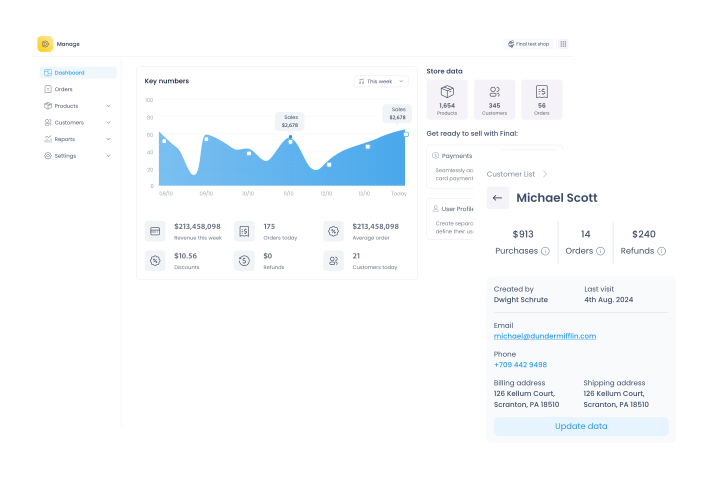
Customization is one thing. But true success comes when your POS lets you manage it all from a single dashboard — without creating chaos behind the scenes.
That’s where Final POS changes the game.
Each client can have a fully customized front-end: different checkout flows, languages, device logic, and branding. But behind the curtain, the backend remains unified — with shared analytics, centralized reports, and synced product and flow data across the board.
That balance — between full customization and centralized control — is what makes modern POS infrastructure essential.
Let Us Handle the Software
Your clients don’t just want a POS. They want checkout flows that are fast, flexible, and on-brand.
And as in life — there’s no such thing as a perfect fit… unless you create it yourself. That’s what makes Final’s approach so game-changing. We’re not here to sell you a one-size-fits-all POS. We’re here to empower you to build something extraordinary for your clients.
Final POS gives the infrastructure to create custom checkout flows that are flexible, fast, and scalable. So instead of drowning in custom dev work, you can focus on what actually moves the needle: Creating great client experiences, growing your business, and scaling smart.
Frequently asked questions
What is a custom checkout flow in a POS system?
A custom checkout flow lets you design and control every step of the checkout experience—such as payments, customer info, and product handling. With Final POS, you can use drag‑and‑drop tools to build your flow with no coding required. It stays fully synced with your e‑commerce platform in real time.
How does Final POS Builder help match a client’s brand identity?
With Final POS Builder, you can fully customize fonts, colors, layout, logos, payment buttons, and more to reflect any brand style. It includes over 30 UI tools, pre-built templates, and advanced styling options to ensure consistency across all sales channels.
Can I create different checkout flows for mobile, desktop, and kiosk experiences?
Yes. Final POS Builder allows you to build device-specific flows—like mobile-first checkouts, tablet kiosks, or kitchen displays. You can publish flows by station type to tailor the experience exactly to the hardware and context.
How does real-time e-commerce sync work in Final POS?
Product data, prices, taxes, stock levels, and customer info are automatically pulled from your e-commerce platform (e.g., WooCommerce). No double data entry—everything updates live, which reduces errors and manual work
What are checkout elements and actions in Final POS Builder?
Elements are visual blocks (like number pads, carts, or payment buttons), while actions are behaviors (like submitting a sale or applying a discount). You can mix and match them using drag-and-drop to build any checkout logic you need—fully customized.
How can agencies and resellers benefit from custom checkout flows?
Resellers and web agencies can offer branded, white-label POS interfaces that match each client's visual identity and workflow. This flexibility increases client value and retention, while making it easier to scale across different industries.
What makes Final POS different from traditional POS systems?
Final POS offers complete flexibility—real-time e-commerce sync, no-code builder tools, offline capabilities, and modular UI design. Unlike traditional systems, it doesn’t force you into a template. You build exactly what your client needs, fast.