



Why Merchants are Switching to Final POS in 2026 (Plus a No-Downtime Migration Checklist)
Merchants are switching to Final POS in 2026 to escape rigid templates, cut subscription costs, and migrate with zero downtime using a parallel setup.
 Mathias NielsenCEO, Final POS

Merchants aren’t switching POS systems in 2026 because they want “new software.” They’re switching because their current POS quietly costs them money every day:
Slower checkout (longer lines, more abandoned purchases)
Workarounds (“just do it this way,” sticky notes, staff improvisation)
Rigid templates (your business has to adapt to the POS)
Subscription creep (another monthly bill, plus add-ons)
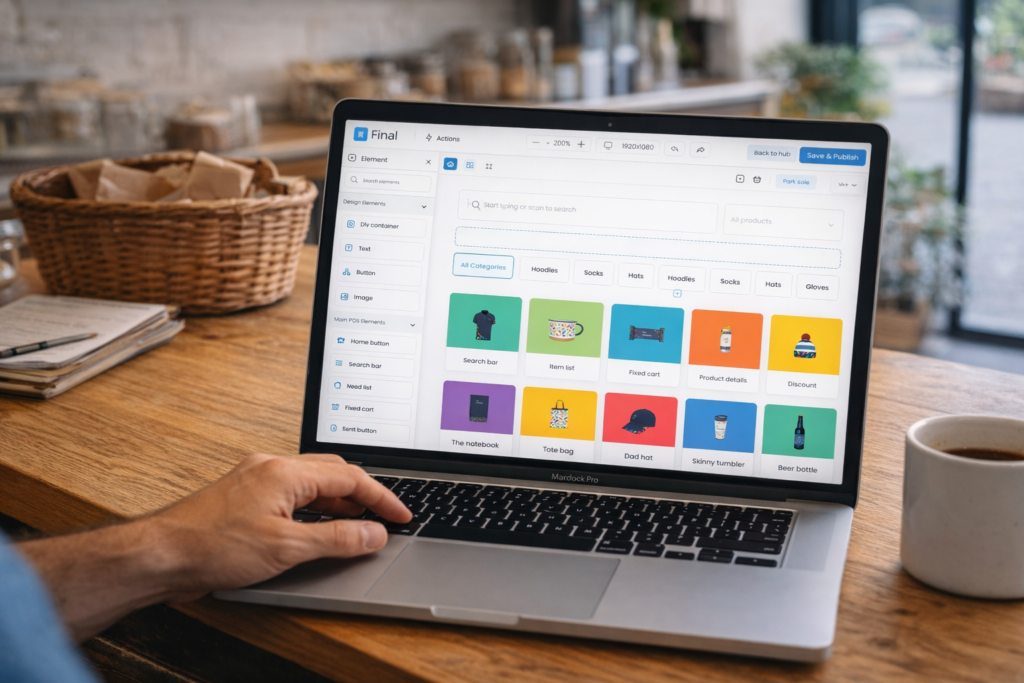
Final is different: it’s a drag-and-drop POS builder that lets you design a checkout that fits your workflow.
And in 2026, one of the biggest reasons merchants are switching to Final is simple:
You can switch with no downtime.
Because Final has no monthly subscription or limited trial period, you can set up Final for free alongside your current POS, build and test your checkout flow, train staff, and only flip the switch when you’re ready—without paying double subscription fees while you prepare.
TL;DR
Merchants switch to Final to escape rigid POS templates and run the checkout flow their business actually needs.
No-downtime switching is a major advantage: set up Final in parallel while your current POS stays live.
No monthly subscription means you can take your time and switch properly.
Use the checklist below to migrate cleanly and flip the switch on your schedule.
What is Final POS?
Final is the world’s first drag-and-drop POS builder. Instead of forcing your business into a fixed POS template, Final lets you design, deploy, and customize your checkout experience to match how you actually sell.
Final is cloud-based (you log in via the web), and checkout flows are accessible via a native app on iOS and Android devices.
Top 5 reasons why merchants are switching to Final POS in 2026
They’re done with rigid POS templates and workarounds
Most POS systems are “one-size-fits-most.” That works until your store has real-world complexity:
Needing custom sales, custom payments, or custom receipts
Offline mode for internet outages
When the POS can’t match your workflow, staff invents workarounds. That creates errors, inconsistent customer experiences, and slower checkout.
Final flips the model: you build the checkout flow your business actually needs.
They want to change their checkout quickly, without breaking everything
In 2026, merchants change things weekly, or sometimes even daily: promos, products, pricing, seasonal inventory, staffing, policies. If your POS makes changes slow or risky, you’re stuck running yesterday’s process.
With Final, your checkout can evolve as fast as your business. Update the flow, adjust layouts, refine the experience—without waiting on your current POS provider to "add it the feature request list" that never comes.
A key reason: they can switch with no downtime
Switching POS used to mean a stressful cutover weekend. Many merchants delay switching because they can’t afford disruption.
Final makes switching safer because you can run a parallel setup:
Keep your current POS live for daily operations
Set up Final in the background
Build your checkout flow and test real scenarios
Train staff before customers ever see the new system
Flip the switch when you’re confident
And because Final has no monthly subscription, you’re not forced to rush. You can prepare properly without paying for an extra monthly POS subscription while your old system is still running.
They’re cutting recurring bills and avoiding subscription creep
Merchants are (understandably) scrutinizing every recurring cost in today's economic climate. A POS subscription often grows over time with add-ons, extra registers, extra users, or higher tiers.
Final is built around a no-monthly-subscription model, which is a better fit for many merchants who want costs aligned to usage rather than another fixed monthly bill.
They want a POS that won’t force a re-platform later
Many merchants rush into the next “standard template” and repeat the cycle. In 2026, merchants are choosing platforms designed to adapt as they grow.
Final is built to be shaped around your business, so you’re not stuck replacing your POS again when your workflow changes.

Who should consider switching to Final?
Final is a strong fit if:
You’ve outgrown rigid template-based POS flows and rely on workarounds
You need a checkout that matches your exact process (not “close enough”)
You want to change your checkout experience quickly and safely
You want a no-monthly-subscription model and don’t want subscription creep
You want to switch POS with no downtime by preparing in parallel
No-Downtime POS Migration Checklist (Flip the switch when you’re ready)
The goal: keep your current POS running while you build and test Final in parallel. Don’t do a risky “big bang” switch unless you have to.
✅ Phase 1: Plan (7–14 days before cutover)
Choose a cutover window. Pick a low-traffic time block and decide who will be on site for the switch.
Define success. Write down what “ready to flip the switch” means (example: staff can complete 10 common transaction scenarios without help).
List what must be migrated:
Products, variants, categories
Taxes
Discounts/promotions
Staff accounts and permissions
Receipt requirements
Return/refund rules and policies
Customer information
Decide what you won’t migrate. Archive dead SKUs, remove duplicates, and simplify categories now.
Set up your Final POS account and start building your first checkout flow, or choose from one of our pre-sets.
✅ Phase 2: Build Final in parallel (3–7 days before cutover)
Build your happy-path checkout (your most common sale end-to-end).
Consider your top 5 real-world scenarios:
Discounted sale
Refund/return
Exchange (if you do exchanges)
Custom sale/custom payment (if applicable)
Your most common edge case
Set up staff permissions (start tighter than you think).
Set up receipts so they reduce support questions (policy clarity, contact details, order ID, branding).
✅ Phase 3: Test and train (1–3 days before cutover)
Run a staff dry run (30–45 minutes). Two staff members, 10 practice transactions. Use the "cash" payment method and refund afterwards to reduce accounting complications.
Fix friction immediately. If staff struggle, your flow is too complex—simplify before customers see it.
Do a “busy hour” simulation. Time transactions and remove slow steps.
✅ Phase 4: Flip the switch (cutover day)
Start controlled. Begin with a single station or a defined time window.
Keep the old POS available as a safety net.
Track any issues in one place. One doc, one owner, rapid fixes.
✅ Phase 5: Stabilize and improve (week 1)
Measure checkout time, voids/refunds, staff confusion points, customer friction points.
Make 3 improvements immediately (remove steps, simplify discounts, tighten return/refund flow, improve receipt clarity).
FAQ
How long does it take to switch POS systems?
Most merchants can complete a staged migration in 1–3 weeks depending on product complexity and how many workflows need to be rebuilt.
Can I switch POS systems with no downtime?
Yes. The safest approach is a parallel setup: keep your current POS live while you build, test, and train in Final, then flip the switch when you’re ready.
Why does “no monthly subscription” matter during a switch?
Because it reduces the cost pressure to rush. You can set up Final in parallel without paying for an extra monthly POS subscription while your old system is still running.
What’s the biggest mistake merchants make when switching POS?
Trying to migrate everything exactly as-is. Migration is the best time to simplify your catalog, remove dead SKUs, and rebuild cleaner workflows.
Why the switch to Final is happening in 2026
Merchants are choosing Final because they want control:
Control over how checkout works
Control over how fast changes happen
Control over costs (without subscription creep)
Control over the switching process, including no downtime
Ready to build your checkout flow in Final and switch on your schedule? Visit finalpos.com to get started.
Frequently asked questions
How long does it take to switch to Final POS?
Most merchants complete a staged migration in 1–3 weeks depending on product catalog complexity and how many workflows need to be rebuilt. The parallel setup approach means your current POS stays live throughout the process.
Can I switch POS systems with no downtime?
Yes. The safest approach is a parallel setup: keep your current POS running while you build, test, and train staff in Final, then flip the switch when you're confident. Final's no monthly subscription means you won't pay double fees while you prepare.
Why do merchants switch away from their current POS?
Common reasons include slower checkout causing abandoned purchases, rigid templates that force staff to use workarounds, and subscription creep from add-ons and extra registers. Final lets merchants design a checkout flow that matches their actual workflow.
What is the biggest mistake when migrating to a new POS?
Trying to migrate everything exactly as-is. A POS migration is the best opportunity to simplify your catalog, remove dead SKUs, and rebuild cleaner workflows rather than replicating old inefficiencies in a new system.
Does Final POS have a monthly subscription?
Final is built around a no-monthly-subscription model, which means you can set up and test Final in parallel with your current POS without paying for two subscriptions at once. This removes the cost pressure to rush your migration.